Safety doesn’t happen by accident—and neither should safety conversations. On busy job sites, where hazards evolve daily, the toolbox talk is one of the most powerful yet underutilized tools in a supervisor’s kit. But without structure, these brief safety huddles often devolve into routine recitations, checked off like a chore rather than a lifeline. That’s where a toolbox talk template PDF becomes essential. It standardizes communication, ensures critical topics are covered, and creates a documented trail of compliance—all in one portable, printable format.
This guide delivers a practical, customizable toolbox talk template PDF you can use today, plus insights to make your safety talks more effective, engaging, and actionable.
Why a Toolbox Talk Template PDF Matters
Toolbox talks—also known as tailgate meetings or safety briefings—are short, informal safety discussions held at the start of a shift or before a high-risk task. They’re designed to reinforce safety protocols, highlight site-specific hazards, and promote open dialogue between workers and supervisors.
Yet, many teams skip them, rush through them, or repeat the same vague message: “Stay safe out there.” Without a consistent format, key information gets lost, compliance records are incomplete, and opportunities for real behavioral change vanish.
A well-designed toolbox talk template PDF solves these problems. It: - Ensures every critical element is addressed (topic, hazards, controls, attendees) - Saves time by eliminating the need to start from scratch - Serves as a legal record during audits or incidents - Supports multilingual or remote teams with a consistent reference - Reinforces a culture of safety through repetition and documentation
In high-risk industries like construction, manufacturing, and utilities, this isn’t just best practice—it’s often a compliance requirement.
Key Elements of an Effective Toolbox Talk Template
Not all templates are created equal. A generic form might look good on paper but fail in the field. To be truly useful, your toolbox talk template PDF must include these non-negotiable sections:
#### 1. Meeting Header - Date and time - Location or work area - Supervisor or facilitator name - Weather conditions (if relevant) - Project name or job number
#### 2. Safety Topic Clearly state the focus: e.g., “Working at Heights,” “Lockout/Tagout Procedures,” “Hazard of the Day: Unguarded Machinery.”
#### 3. Identified Hazards List specific risks associated with the task or environment. Avoid vague terms like “fall hazard”—be precise: “Unprotected edge on 3rd-floor slab near stairwell.”
#### 4. Control Measures Detail mitigation strategies: guardrails, PPE requirements, isolation procedures, or communication protocols.
#### 5. Worker Participation Section Include space for: - Signatures or printed names of attendees - A line or checkbox confirming understanding - Optional: “Questions or concerns” field to encourage dialogue
#### 6. Follow-Up Actions Note any required corrections, equipment checks, or training referrals that came up during the talk.
A strong template is clean, printable, and fits on a single page—long enough to be thorough, short enough to be used consistently.
Free Toolbox Talk Template PDF: What’s Included
We’ve created a print-ready toolbox talk template PDF designed for real-world usability. It’s not a bloated corporate form—it’s built by safety professionals who’ve led hundreds of job site talks.
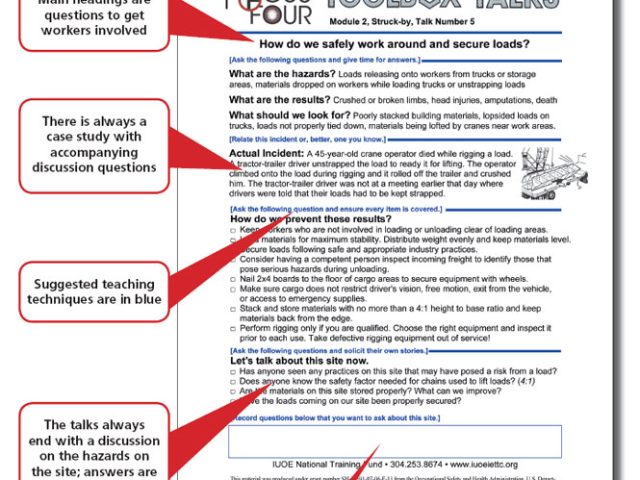
Download includes: - Editable PDF (fillable fields for date, topic, attendees) - Print-friendly layout (black-and-white optimized) - Space for 10+ attendee signatures - Visual hazard icons (optional for quick recognition) - Version for non-English speakers (keywords in Spanish/French)
This isn’t just a form—it’s a workflow tool. Use it to: - Archive weekly safety topics - Track attendance for OSHA or client audits - Identify recurring issues across multiple talks
The template avoids jargon and fits in a clipboard, truck door, or tablet—exactly where safety conversations happen.
Common Mistakes That Undermine Toolbox Talks
Even with a solid toolbox talk template PDF, poor execution can render the effort meaningless. Avoid these common pitfalls:
#### Mistake 1: Repeating the Same Topic Weekly Talking about “slips, trips, and falls” every Monday without variation breeds complacency. Rotate topics and tie them to real-time site conditions.
#### Mistake 2: Skipping Worker Sign-Ins No signatures = no proof. Documenting attendance isn’t bureaucracy—it’s evidence of due diligence.
#### Mistake 3: No Follow-Up on Hazards Raised If a worker flags a damaged harness during the talk but nothing changes, trust erodes. Use the “follow-up” section to assign actions and close the loop.
#### Mistake 4: Reading Directly from the Template The template supports the conversation—it shouldn’t be the conversation. Use it as a guide, not a script.
#### Mistake 5: Holding Talks Indoors or Without Visuals Conduct the talk at the actual work location when possible. Point to the hazard. Show the equipment. Make it real.
A template can’t fix poor leadership—but it can expose gaps in safety culture when consistently ignored.
How to Customize Your Template for Maximum Impact
One-size-fits-all doesn’t work in safety. Adapt your toolbox talk template PDF for your team’s needs.
#### For Multilingual Teams Add visual symbols (⚠️ for hazard, 🧤 for PPE) and translate key headers. Even if the form is in English, icons help reinforce understanding.
#### For High-Risk Tasks Include a pre-task checklist on the back: “Has the area been cordoned off? Are emergency contacts posted?”
#### For Remote or Rotating Crews Use a digital version (PDF + tablet) with cloud backup. Store completed talks in a shared folder by date.
#### For Safety Audits Number each talk (e.g., “Talk #24 – Confined Space Entry”) and maintain a master log. This makes regulatory reviews faster and less stressful.
Customization isn’t about redesigning the wheel—it’s about making the wheel grip the terrain.
5 Top Tools for Creating or Managing Toolbox Talks
While a free toolbox talk template PDF works for most teams, some organizations need more advanced tools. Here are five reliable options that go beyond paper:
| Tool | Key Feature | Best For |
|---|---|---|
| SafetyCulture (iAuditor) | Mobile app with pre-built templates, photo upload, analytics | Digital teams, enterprise safety programs |
| Formstack + PDF Templates | Convert static PDFs into web forms with auto-save | Offices wanting hybrid digital-paper workflows |
| SiteDocs | Full safety management platform with talk scheduling | Large construction or industrial sites |
| GoCanvas | Customizable mobile forms, offline use, cloud sync | Field crews without reliable internet |
| Microsoft Forms + SharePoint | Free for Microsoft 365 users, integrates with Teams | Budget-conscious teams already in the Microsoft ecosystem |
While these tools offer automation, don’t overlook the simplicity of a printed toolbox talk template PDF. For many crews, paper is faster, more reliable, and more accessible.

Real-World Use Cases: When the Template Saved the Day
#### Case 1: Preventing a Fall Incident A supervisor used the template to highlight “roof edge protection” before reroofing began. A worker pointed out a missing guardrail during the talk. It was installed before work started—no fall occurred. The signed PDF became proof of proactive hazard identification.
#### Case 2: Audit Ready in 10 Minutes During an OSHA inspection, a contractor was asked for safety meeting records. Because every talk had been documented using the same toolbox talk template PDF, the binder was organized, complete, and accepted without issue.
#### Case 3: Onboarding New Crew Members A subcontractor arrived with no site-specific training. The foreman used the template to deliver a 10-minute orientation on site rules, PPE, and emergency procedures. Signatures confirmed comprehension—reducing liability.
These aren’t hypotheticals. They’re outcomes made possible by consistency, documentation, and a simple piece of paper.
Making Safety Stick: Beyond the Template
A toolbox talk template PDF is a tool, not a solution. Real safety improvement happens when: - Supervisors are trained to facilitate, not lecture - Workers are encouraged to speak up without fear - Management reviews talk logs and acts on trends - Topics are tied to near-misses or recent incidents
Use the template as a starting point—not the finish line.
Integrate it into your safety management system. Review monthly: Are the same hazards coming up? Are attendance rates dropping? Are follow-ups being completed? Let the data guide your actions.
Download and Use Your Toolbox Talk Template PDF Today
Safety conversations shouldn’t be left to chance. Grab a free, customizable toolbox talk template PDF and start running meaningful, documented briefings tomorrow.
Print it, post it, improve it. Use it in rain or shine, on day one or day 500. Because when a near-miss becomes an incident, the first question won’t be “Was there a hazard?”—it’ll be “Was it discussed? Was it documented?”
Be ready with the answer.
FAQ
Where can I get a free toolbox talk template PDF? You can download a free, fillable toolbox talk template PDF from reputable safety sites like OSHA.gov, SafetyCulture, or trusted industry publishers. Ensure it includes space for signatures, hazards, and controls.
Can I edit a toolbox talk template PDF? Yes—many templates are designed as fillable PDFs. Use Adobe Acrobat, Foxit, or free online tools to add your company logo, adjust fields, or translate content.
How often should toolbox talks be held? At minimum, weekly. But they should also occur before high-risk tasks, after incidents, or when new hazards are introduced.
Do toolbox talks need to be signed? Yes. Signatures or printed names verify attendance and understanding. They’re critical for compliance and liability protection.
What topics should I cover in toolbox talks? Rotate through PPE, fall protection, electrical safety, equipment use, hazard communication, and job-specific risks. Align topics with current site activities.
Can I use a digital toolbox talk instead of a PDF? Absolutely. Digital tools offer advantages like photo uploads and analytics. But a printed PDF remains valid and often more practical in field conditions.
Is a toolbox talk the same as a safety meeting? It’s a type of safety meeting—shorter and more focused. Traditional safety meetings may last hours; toolbox talks are 5–15 minutes and task-specific.
FAQ
What should you look for in Toolbox Talk Template PDF: Free Download & Best Practices? Focus on relevance, practical value, and how well the solution matches real user intent.
Is Toolbox Talk Template PDF: Free Download & Best Practices suitable for beginners? That depends on the workflow, but a clear step-by-step approach usually makes it easier to start.
How do you compare options around Toolbox Talk Template PDF: Free Download & Best Practices? Compare features, trust signals, limitations, pricing, and ease of implementation.
What mistakes should you avoid? Avoid generic choices, weak validation, and decisions based only on marketing claims.
What is the next best step? Shortlist the most relevant options, validate them quickly, and refine from real-world results.